
How do I add an image to my call?
It is very simple!
- Create a new call or click 'Edit' on an existing call
- Find this page and upload your image:
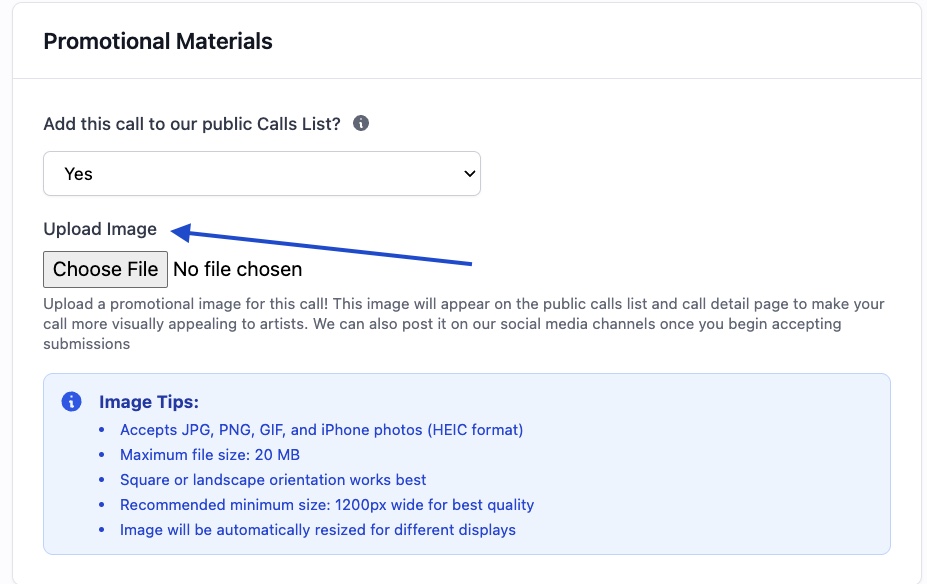
Now this image will appear on your call detail page, as well as the "card" on the calls list and in social media shares.
Image Recommendations
Your call image is the first thing artists see. Make it count!
Dimensions and Format
Ideal size: 1500 x 785 pixels (landscape, roughly 2:1)
Format: JPG, PNG, GIF, or iPhone photos (HEIC), up to 20 MB
Resolution: At least 1200 pixels wide, so it stays sharp on large screens
How Your Image Appears
Your image appears in three places. Each one shapes it a little differently:
- Call page: The banner fills the full width of the page. Wide images, including banners with text, show in full on computers and phones. Square and portrait images are trimmed to a banner shape. Use Reposition to choose which part shows.
- Calls list: Your call card shows a short strip of the image, trimmed at the top and bottom.
- Link previews: When someone shares your call link in an email, text, or social post, your image appears next to the call title and deadline, trimmed to a near-square shape.
What Makes a Good Call Image?
Do: - Use an image of artwork or your venue that represents the exhibition - Keep logos and text in the center of the image, so they show in link previews too - Upload a landscape image around 1500 x 785 pixels
Don't: - Put the call title or deadline only in the image. They already appear next to it on the page, on the card, and in link previews - Place important text or details near the edges - Use low-resolution or pixelated images
Tip: Most design tools (Canva, Photoshop, etc.) have landscape banner templates. A "Twitter post" or "Facebook post" template is close to the right shape.